NK AI Studio
NK AI Studio
Home TikTok Support Terms Privacy

TikTok Integration

App Name: NK AI Studio Website: nkstudio.org Last Updated: August 1, 2026 Operator: NK Studio

Contents

  1. What NK AI Studio is
  2. How the TikTok integration works
  3. Permissions we request
  4. What we never do
  5. Data retention & deletion
  6. Contact

1What NK AI Studio is

NK AI Studio is a web-based content production and brand management platform for individual creators and small brand owners. It runs entirely in the browser at nkstudio.org.

Inside the editor a user plans a campaign, generates the script, images, video and voice-over with AI, and reviews the finished asset. Only after the user explicitly approves that exact asset on screen is it published to the user's own connected social accounts. After publishing, the user can see how each post performed and use that to plan the next one.

TikTok is one of the supported destinations, alongside YouTube, Instagram, Facebook, Threads and X. Connecting a TikTok account is entirely optional — the rest of the product works without it.

Human approval is mandatory. Nothing is ever posted automatically, on a schedule, or in bulk. Every single post requires a confirmation step in which the caption, the media, the audience setting and the content disclosures are shown before the post is sent.

2How the TikTok integration works

Four steps, in this order. Every step that touches TikTok is shown below with a screenshot of the actual product UI.

1 Connect user.info.basic
The user opens Settings > SNS Connections and presses Connect TikTok. They are redirected to TikTok's own authorization page, grant consent there, and return to https://nkstudio.org/auth/tiktok/callback. We then call TikTok's user info endpoint exactly once and read only open_id, display_name and username, so the connected account name is visible on the screen from that point on.
After authorizing, the connected TikTok account is shown so the user always knows which account will be posted to.
2 Create no TikTok data used
The user produces the content inside NK AI Studio — scenario, images, video, narration and caption. This step uses no TikTok data and calls no TikTok API. The finished asset is stored in that user's own private storage.
3 Review & Approve video.publish
Pressing Publish to TikTok does not publish anything. We first query TikTok's creator_info endpoint and build a confirmation dialog from the response. In that dialog the user sees the creator nickname and a preview of the media and caption, and must:
  • choose who can view this video from the privacy levels the account allows — no option is pre-selected, and the Post button stays disabled until one is chosen;
  • set the Comment / Duet / Stitch toggles, with any interaction the creator has disabled shown as unavailable;
  • declare whether the post is commercial content — "Your brand" and/or "Branded content" — and confirm the resulting "Promotional content" / "Paid partnership" label, next to links to TikTok's Branded Content Policy and Music Usage Confirmation.
Only when the user presses the confirm button do we send the post to TikTok using exactly the values the user selected.
Nothing is pre-selected. The user must choose the audience and explicitly turn on each interaction before the post button becomes available.
Commercial content disclosure is off by default. When the user turns it on, the resulting TikTok label and the applicable policies are shown before posting.
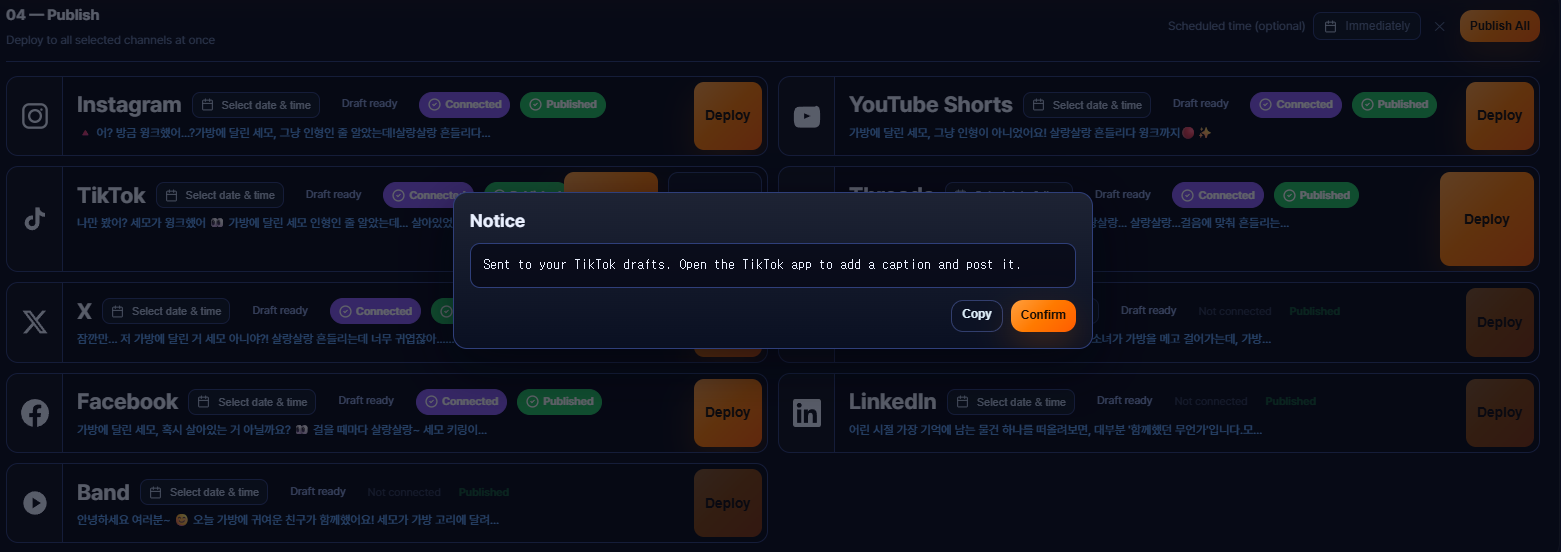
4 Publish & Measure video.publish · video.list
We show posting progress while TikTok processes the upload, then a link to the published post. Later, on the Analytics dashboard, the user can sync their recent TikTok videos and see view, like, comment and share counts for their own posts, so they can compare what worked and plan the next piece of content.
Performance data retrieved with video.list is shown only to the account owner, with thumbnails and links back to the original posts on TikTok.

3Permissions we request

We request three scopes. We do not request video.upload.

Scope What we access Why What we store
user.info.basic
Login Kit
A single call to the user info endpoint immediately after the OAuth token exchange, requesting only open_id, display_name, username. display_name and username are shown on the SNS Connections screen and again in the publish confirmation dialog, so that before approving a post the user can visually confirm which TikTok account the content will be sent to. Our users often manage more than one brand account. open_id is the internal key that binds the stored token and the performance data to the correct account. open_id, display_name, username, and the access/refresh tokens. Nothing else — no followers, following, likes, bio or avatar.
video.publish
Content Posting API — Direct Post
creator_info/query for the creator nickname, allowed privacy levels, max duration and comment/duet/stitch availability; then video/init or content/init to send the approved post; then status/fetch to follow its progress. This is the core feature of the product and the reason we integrate with TikTok at all: publishing the asset the user created and approved inside NK AI Studio to their own TikTok account, with the audience and disclosure settings they chose on screen. The returned publish_id and the resulting post id and URL, so the user can open their own post from our interface and so performance data can be matched to it.
video.list
Display API
For up to 20 of the user's most recent videos: id, title, video_description, duration, cover_image_url, embed_link, create_time, like_count, comment_count, share_count, view_count. Shown to that same user as a performance table and charts, so they can compare how content published through NK AI Studio performed against their other posts. cover_image_url renders the thumbnail and embed_link sends the user back to the original video on TikTok. The aggregate counts feed our planning tool, which suggests what to produce next. The listed metrics plus the video id and embed link, in that user's private record, refreshed on each sync. We never download or re-host TikTok video files.

Media delivery: videos are sent with FILE_UPLOAD — our server reads the file from the user's private storage and uploads it straight to TikTok, so the video is never exposed on a public URL. Photo posts must use PULL_FROM_URL, which requires a verified domain, so those images are served through https://nkstudio.org/api/sns/tiktok-media, a proxy on our own verified domain that streams the user's file only when accompanied by a short-lived HMAC-SHA256 signed token generated at publish time.

Before app approval: until this app passes TikTok's review, our server forces privacy_level to SELF_ONLY regardless of what the user selects, so that no post created through our app can become publicly visible before review is complete.

4What we never do

  • No automatic or unattended posting. There is no scheduler, no bulk poster and no bot. Every post passes through the confirmation dialog described above.
  • No exposure to other users. One user's TikTok data is never shown to any other NK AI Studio user, and never aggregated across accounts.
  • No selling and no model training. TikTok data is never sold, never used for advertising, and never used to train any AI model.
  • No re-hosting of TikTok videos. We store metrics and links only. Video files stay on TikTok, and thumbnails and embed links send traffic back there.
  • No use of TikTok as a login provider. Users sign in to NK AI Studio with their own NK AI Studio account. TikTok authorization is used solely to establish the publishing connection.
  • No posting of content the user has not seen. The media is content the user created inside NK AI Studio and approved on screen.

5Data retention & deletion

  • All TikTok data is scoped to the single NK AI Studio user who authorized it.
  • Tokens and TikTok data are kept in a private per-user object in Google Cloud Storage, encrypted at rest. Access tokens are refreshed through TikTok's token endpoint using the refresh token.
  • Disconnecting: the user can disconnect TikTok at any time from Settings > SNS Connections. This immediately deletes the stored tokens and all cached TikTok data.
  • Account deletion: deleting the NK AI Studio account deletes everything, including all TikTok tokens and cached metrics.
  • You may also request deletion by email at any time — see the contact section below.

Full details are in our Privacy Policy and Terms of Service.

6Contact

Support Email [email protected]
Response Time Within 3 business days
Operator NK Studio
Help Center nkstudio.org/support

TikTok 연동 안내

앱 이름: NK AI Studio 웹사이트: nkstudio.org 최종 수정: 2026년 8월 1일 운영사: NK Studio

목차

  1. NK AI Studio 소개
  2. TikTok 연동 동작 방식
  3. 요청하는 권한
  4. 절대 하지 않는 것
  5. 데이터 보관 및 삭제
  6. 문의

1NK AI Studio 소개

NK AI Studio는 개인 창작자와 소규모 브랜드 운영자를 위한 웹 기반 콘텐츠 제작·브랜드 관리 플랫폼입니다. 별도 설치 없이 nkstudio.org에서 브라우저로 동작합니다.

사용자는 에디터 안에서 캠페인을 기획하고 대본·이미지·영상·나레이션을 AI로 생성한 뒤 결과물을 검토합니다. 화면에서 직접 승인한 그 결과물만 사용자 본인의 연결된 SNS 계정에 게시됩니다. 게시 후에는 각 게시물의 성과를 확인하고 다음 콘텐츠 기획에 반영할 수 있습니다.

TikTok은 지원 채널 중 하나이며 YouTube, Instagram, Facebook, Threads, X도 함께 지원합니다. TikTok 계정 연결은 선택 사항으로, 연결하지 않아도 나머지 기능은 그대로 사용할 수 있습니다.

사람의 승인이 반드시 필요합니다. 자동 게시·예약 대량 게시는 존재하지 않습니다. 모든 게시는 캡션·미디어·공개 범위·상업적 콘텐츠 고지를 화면에 띄우고 사용자가 확인 버튼을 누른 뒤에만 실행됩니다.

2TikTok 연동 동작 방식

아래 4단계 순서로 동작하며, TikTok과 연결되는 단계마다 실제 화면 스크린샷을 함께 제공합니다.

1 연결 (Connect) user.info.basic
설정 > SNS 연결에서 TikTok 연결을 누르면 TikTok 공식 인증 화면으로 이동합니다. 사용자가 동의하면 https://nkstudio.org/auth/tiktok/callback으로 돌아오고, 이때 사용자 정보 API를 단 한 번 호출해 open_id, display_name, username만 읽습니다. 이후 화면에는 연결된 계정 이름이 표시됩니다.
인증을 마치면 연결된 TikTok 계정이 표시되어, 어느 계정으로 게시되는지 사용자가 항상 알 수 있습니다.
2 제작 (Create) TikTok 데이터 미사용
NK AI Studio 안에서 시나리오·이미지·영상·나레이션·캡션을 제작합니다. 이 단계에서는 TikTok 데이터를 전혀 사용하지 않고 TikTok API도 호출하지 않습니다. 완성된 결과물은 해당 사용자의 비공개 저장소에 보관됩니다.
3 검토 및 승인 (Review & Approve) video.publish
TikTok에 게시를 눌러도 즉시 게시되지 않습니다. 먼저 TikTok의 creator_info를 조회해 그 응답으로 확인 모달을 구성합니다. 사용자는 크리에이터 닉네임과 미디어·캡션 미리보기를 확인한 뒤 다음을 직접 선택해야 합니다.
  • 계정이 허용하는 범위 안에서 공개 대상을 선택합니다. 기본 선택값은 없으며, 선택하기 전까지 게시 버튼은 비활성 상태입니다.
  • 댓글 / 듀엣 / 스티치 허용 여부를 설정합니다. 크리에이터가 비활성화해 둔 항목은 선택할 수 없게 표시됩니다.
  • 상업적 콘텐츠 여부("자사 브랜드" 및/또는 "브랜디드 콘텐츠")를 고지하고, 그에 따라 붙는 "홍보 콘텐츠" / "유료 광고" 라벨과 TikTok의 브랜디드 콘텐츠 정책·음원 사용 확인 링크를 확인합니다.
사용자가 확인 버튼을 누른 뒤에야, 사용자가 고른 값 그대로 TikTok에 게시 요청을 보냅니다.
기본 선택은 아무것도 없습니다. 사용자가 공개 범위를 고르고 각 상호작용을 직접 켜야 게시 버튼이 활성화됩니다.
상업적 콘텐츠 고지는 기본이 꺼짐입니다. 사용자가 켜면 TikTok에 붙을 라벨과 적용되는 정책을 게시 전에 보여줍니다.
4 게시 및 성과 측정 (Publish & Measure) video.publish · video.list
TikTok이 업로드를 처리하는 동안 진행 상태를 표시하고, 완료되면 게시물 링크를 보여줍니다. 이후 애널리틱스 대시보드에서 본인의 최근 TikTok 영상을 동기화해 조회수·좋아요·댓글·공유 수를 확인하고, 무엇이 잘 됐는지 비교해 다음 콘텐츠를 기획할 수 있습니다.
video.list로 가져온 성과 데이터는 계정 소유자에게만 표시되며, 썸네일과 TikTok 원본 게시물로 돌아가는 링크가 함께 제공됩니다.

3요청하는 권한

요청하는 스코프는 3개입니다. video.upload는 요청하지 않습니다.

스코프 접근하는 데이터 사용 목적 저장하는 항목
user.info.basic
Login Kit
OAuth 토큰 교환 직후 사용자 정보 API를 1회 호출해 open_id, display_name, username만 요청합니다. display_name·username은 SNS 연결 화면과 게시 확인 모달에 표시되어, 사용자가 승인 전에 어느 TikTok 계정으로 게시되는지 눈으로 확인할 수 있게 합니다(브랜드 계정을 여러 개 운영하는 사용자가 많습니다). open_id는 저장된 토큰과 성과 데이터를 올바른 계정에 연결하는 내부 키로 씁니다. open_id, display_name, username, 액세스/리프레시 토큰. 그 외에는 저장하지 않습니다(팔로워·팔로잉·좋아요·소개글·프로필 사진 모두 미수집).
video.publish
Content Posting API — Direct Post
크리에이터 닉네임·허용 공개범위·최대 길이·댓글/듀엣/스티치 가능 여부를 얻기 위한 creator_info/query, 승인된 게시물을 보내는 video/init 또는 content/init, 진행 상태를 확인하는 status/fetch. 제품의 핵심 기능이자 TikTok과 연동하는 이유입니다. NK AI Studio에서 사용자가 만들고 승인한 결과물을, 화면에서 직접 고른 공개 범위·고지 설정 그대로 본인 TikTok 계정에 게시합니다. 응답으로 받은 publish_id와 결과 게시물 id·URL. 사용자가 우리 화면에서 자기 게시물을 바로 열 수 있게 하고, 성과 데이터를 해당 게시물에 매칭하기 위함입니다.
video.list
Display API
사용자의 최근 영상 최대 20건에 대해 id, title, video_description, duration, cover_image_url, embed_link, create_time, like_count, comment_count, share_count, view_count. 같은 사용자에게 성과 표와 그래프로 보여주어, NK AI Studio로 게시한 콘텐츠와 다른 게시물의 성과를 비교할 수 있게 합니다. cover_image_url은 썸네일 표시, embed_link는 원본 TikTok 영상으로 돌려보내는 데 씁니다. 집계 수치는 다음에 어떤 콘텐츠를 만들지 제안하는 기획 도구의 입력으로 사용합니다. 위 지표와 영상 id·임베드 링크를 해당 사용자의 비공개 레코드에 저장하며, 동기화할 때마다 갱신합니다. TikTok 영상 파일은 절대 내려받거나 재호스팅하지 않습니다.

미디어 전달 방식: 영상은 FILE_UPLOAD로 보냅니다. 서버가 사용자의 비공개 저장소에서 파일을 읽어 TikTok에 바로 업로드하므로, 영상이 공개 URL에 노출되지 않습니다. 사진 게시는 PULL_FROM_URL만 지원하고 이 방식은 도메인 소유 인증을 요구하므로, 이미지는 자체 인증 도메인의 프록시 https://nkstudio.org/api/sns/tiktok-media를 통해 제공됩니다. 이 프록시는 게시 시점에 발급한 단기 HMAC-SHA256 서명 토큰이 있을 때만 파일을 스트리밍합니다.

앱 심사 통과 전: 심사를 통과하기 전까지 서버는 사용자가 무엇을 선택하든 privacy_level을 SELF_ONLY로 강제합니다. 심사가 끝나기 전에 이 앱으로 만든 게시물이 공개될 수 없게 하기 위함입니다.

4절대 하지 않는 것

  • 자동·무단 게시 없음. 스케줄러도, 대량 게시기도, 봇도 없습니다. 모든 게시는 위 확인 모달을 거칩니다.
  • 다른 사용자에게 노출 없음. 한 사용자의 TikTok 데이터는 다른 NK AI Studio 사용자에게 절대 표시되지 않으며 계정 간 집계도 하지 않습니다.
  • 판매·모델 학습 사용 없음. TikTok 데이터는 판매하지 않고, 광고에 사용하지 않으며, 어떤 AI 모델의 학습에도 사용하지 않습니다.
  • TikTok 영상 재호스팅 없음. 지표와 링크만 저장합니다. 영상 파일은 TikTok에 그대로 있고, 썸네일과 임베드 링크는 트래픽을 TikTok으로 돌려보냅니다.
  • TikTok을 로그인 수단으로 사용하지 않음. NK AI Studio 로그인은 자체 계정으로 합니다. TikTok 인증은 오직 게시 연결을 만드는 데만 씁니다.
  • 사용자가 보지 않은 콘텐츠 게시 없음. 게시되는 미디어는 사용자가 NK AI Studio에서 만들고 화면에서 승인한 결과물입니다.

5데이터 보관 및 삭제

  • 모든 TikTok 데이터는 인증한 NK AI Studio 사용자 한 명에게만 귀속됩니다.
  • 토큰과 TikTok 데이터는 Google Cloud Storage의 사용자별 비공개 객체에 저장되며 저장 시 암호화됩니다. 액세스 토큰은 리프레시 토큰으로 TikTok 토큰 엔드포인트를 통해 갱신합니다.
  • 연결 해제: 설정 > SNS 연결에서 언제든지 TikTok 연결을 해제할 수 있으며, 이때 저장된 토큰과 캐시된 TikTok 데이터가 즉시 삭제됩니다.
  • 계정 삭제: NK AI Studio 계정을 삭제하면 TikTok 토큰과 캐시된 지표를 포함해 전부 삭제됩니다.
  • 이메일로도 언제든 삭제를 요청할 수 있습니다(아래 문의 참조).

자세한 내용은 개인정보처리방침과 서비스 이용약관을 참고하세요.

6문의

지원 이메일 [email protected]
응답 기한 영업일 기준 3일 이내
운영사 NK Studio
지원 센터 nkstudio.org/support
© 2026 NK Studio. All rights reserved.
Home | TikTok Integration | Support | Terms | Privacy Policy | Contact